
Best Font Bundles for Logo Designers on Creative Market (2026)
Buying fonts one by one is expensive. A single premium font can cost $30 or more on its own. That is why font bundles for logo designers are such a smart move. In fact, the right bundle gives you dozens of commercial-licensed fonts for the price of one or two individual files. Furthermore, you get more style options to serve different clients and brand types. Creative Market is one of the best places to find these bundles. The quality is high, the licences are clear, and the variety is huge. In this post, we tested three of the best picks for 2026.
Top Font Bundles for Logo Designers on Creative Market
Each bundle below is chosen for logo work specifically. That means clean files, solid commercial licences, and styles that work at small sizes. Together, these three picks cover display logos, brand identity work, and high-end serif branding. Let’s look at each one.
Merong Family (24 Fonts) — by Yahya-type

The Merong Family gives you a complete type system in one download. Specifically, you get 24 font styles that range from bold display weights to lighter, more refined cuts. This makes it very easy to build full brand systems without leaving the family. As a result, your logos stay consistent across headings, subheadings, and body text. The broad range of weights also means you can serve many different brand personalities — from bold and modern to clean and minimal. Therefore, this bundle is a strong pick for designers who take on varied client work.
- 24 font style files (OTF + TTF)
- Commercial use licence
- Extended character set
- Multiple weights from light to bold
The Logo and Branding Font Bundle — by Beck McCormick
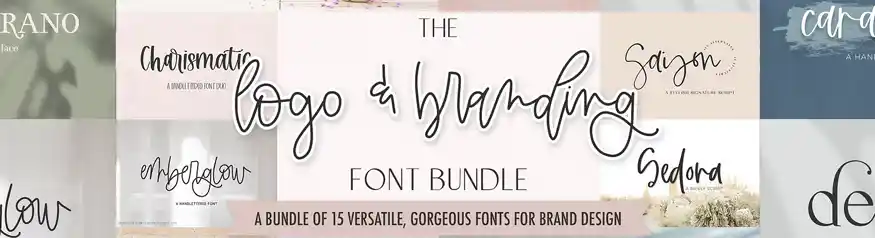
This bundle is built from the ground up for logo and brand design. In fact, Beck McCormick is a well-known type designer on Creative Market, and this collection shows exactly why. You get 15 fonts that mix scripts, serifs, and clean sans-serifs. Furthermore, each font is designed to pair well with the others. This makes font pairing much faster and easier. As a result, you spend less time testing combinations and more time designing. The commercial licence also covers client work, so you can deliver these fonts in final logo files without any problems.
- 15 font files (OTF + TTF)
- Scripts, serifs, and sans-serifs
- Commercial use licence for client work
- Web font formats included
Classy Serif Font Bundle — by BrandSemut
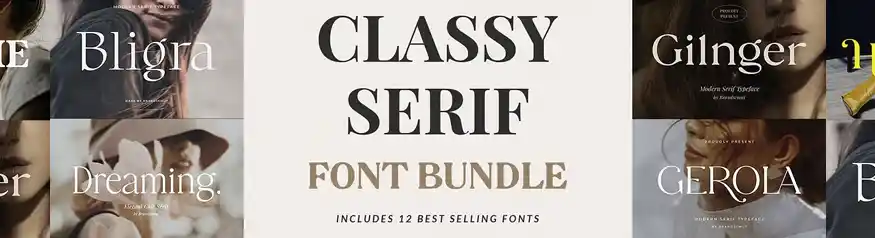
Serif fonts remain the top choice for high-end and luxury brand logos. Specifically, the Classy Serif Font Bundle by BrandSemut gives you 12 of the best-selling serif styles in one package. Each font has a clean, elegant feel that works very well for premium brand identities, wedding businesses, and boutique shops. In addition, each font comes with ligatures and alternate characters. This means you can fine-tune letterforms to make logos feel completely unique. Together, these 12 fonts cover a wide range of elegant brand moods — from refined and editorial to warm and inviting.
- 12 serif font files (OTF + TTF)
- Ligatures and alternate characters
- Commercial use licence
- Best-selling styles in one bundle
Browse All Font Bundles on Creative Market
Hundreds of commercial-licensed font bundles for every brand style and budget.
Explore Creative Market →How These Font Bundles Compare
Not every bundle suits every project. Therefore, use this table to find the right pick for your specific needs and budget.
| Feature | Merong Family | Logo & Branding Bundle | Classy Serif Bundle |
|---|---|---|---|
| Font Count | 24 | 15 | 12 |
| Price | $59 | $23 | $29 |
| Commercial Licence | ✓ | ✓ | ✓ |
| Script Fonts | ✓ | ✓ | — |
| Serif Fonts | ✓ | ✓ | ✓ |
| Ligatures / Alternates | ✓ | ✓ | ✓ |
| Best For | Display logos, full brand systems | Brand identity, client work | Luxury and high-end brands |
What to Look for in Font Bundles for Logo Designers
Not all font bundles are equal. Some look great in previews but fall apart in real logo work. Therefore, here are the three most important things to check before you buy.
Commercial Licence Included
This is the most important factor. A personal licence only covers your own use. For client logos, you need a commercial licence. In fact, using a personal-only font in a client logo can cause legal problems. Always confirm the licence type before you buy. Fortunately, all three bundles in this list include a clear commercial licence. This means you can deliver final files to clients with full confidence.
Style Variety Within the Bundle
A good font bundle for logo work needs variety. Specifically, look for a mix of scripts, serifs, and sans-serifs. This way, you can serve many different brand types without buying more bundles. Furthermore, variety helps with font pairing. When a bundle includes complementary styles, you can combine two or three fonts from the same pack. As a result, your logo lockups feel designed rather than assembled.
File Formats and Software Support
Most professional bundles include both OTF and TTF files. OTF works best in Adobe Illustrator, Photoshop, and InDesign. TTF works well in Canva and Affinity Designer. In addition, some bundles include web fonts for use in websites and digital deliverables. Check the file list before you buy. This step only takes a moment, and it saves you from compatibility problems later.
How to Use Font Bundles for Your Logo Projects
Buying a font bundle is the easy part. Using it well takes a small amount of planning. First, follow these five steps to get the most from your new fonts every time.
Define the Brand Personality First
Before you open any font file, write down three words that describe the brand. Bold, playful, and modern is different from refined, quiet, and elegant. These words guide which fonts you pick from the bundle. Specifically, bold brands suit heavy display fonts. Elegant brands suit thin serifs. Starting with words instead of visuals saves a lot of time.
Match Font Style to the Brand Mood
After that, open the font bundle folder and scan through the preview files. Most bundles include a PDF or image sheet showing all fonts together. Look for the styles that match your three brand words. Narrow your list down to three or four options. This makes the next step much faster and easier.
Install the Fonts and Test in Your Design Tool
Install your shortlist of fonts on your computer. In Illustrator or Canva, type the brand name in each font and compare them side by side. Furthermore, test at different sizes — especially small. A font that looks great at 72pt can become unreadable at 12pt. Logo fonts need to work at both scales.
Pair Two Fonts for Visual Hierarchy
Most strong logos use two fonts — a primary and a secondary. For example, pair a bold display font with a clean sans-serif for the tagline. Bundles make this easy because the fonts are designed to work together. Therefore, try pairing a script from the bundle with a matching serif. The combination creates depth and professional polish.
Save Your Font Pairings for Future Projects
Finally, keep a simple document with your favourite pairings from each bundle. Note the font names, weights, and the brand types they suit. This way, you build a personal font system over time. As a result, future logo projects start faster because you already know which combinations work. This small habit makes a big difference to your workflow.
Frequently Asked Questions
Are these font bundles commercially licensed for client work?
Yes. All three bundles in this list include a commercial use licence. This means you can use the fonts in logos and brand files you deliver to paying clients. However, always read the specific licence terms on the product page, as some bundles have limits on the number of end users or print run sizes.
Can I use these fonts on digital products I sell on Etsy?
In most cases, yes — but check the extended licence options first. Standard commercial licences cover client logos and print work. If you plan to sell digital products that include the font itself (such as editable templates), you may need an extended or OEM licence. Creative Market makes it easy to upgrade your licence directly on the product page.
What file formats do these font bundles include?
Most Creative Market font bundles include OTF and TTF files. OTF works best in Adobe software like Illustrator and Photoshop. TTF works well in Canva, Affinity, and most Windows applications. Some bundles also include WOFF and WOFF2 files for web use. Check the product description for the full file list before you buy.
How many fonts do I actually need for logo design?
You do not need hundreds of fonts. In fact, most professional logo designers use a core library of 20 to 50 fonts they know well. The key is depth, not quantity. A well-chosen bundle of 12 to 24 fonts gives you enough variety to serve most client types without the overwhelm of a massive library.
Are font bundles on Creative Market worth the money?
Absolutely. A single premium font on Creative Market can cost $15 to $40 on its own. A bundle of 12 to 24 fonts for $23 to $59 is exceptional value by comparison — that works out to just $2 to $4 per font. Furthermore, Creative Market vets its sellers, so the quality is consistently high. If you do any regular logo or brand design work, a good font bundle pays for itself on the first client project.
Verdict
All three font bundles for logo designers on this list are solid investments. Together, they cover every major brand style — from bold and modern to refined and elegant. Moreover, each one includes a commercial licence, so you can use them in client work straight away. If you can only pick one, start with the Logo and Branding Bundle by Beck McCormick. It gives you the best mix of styles for the widest range of projects. After that, add the Classy Serif Bundle when you start taking on more premium clients.
Find More Font Bundles on Creative Market
New bundles drop every week. Browse hundreds of commercial-licensed options for every budget.
Shop Creative Market Now →