Best Online Courses for Adobe Illustrator in 2026 (For Digital Artists & Etsy Sellers)
Adobe Illustrator is the tool behind the highest-earning digital products on Etsy — sticker sheets, SVG files, clipart bundles, surface pattern collections, and logo templates. If you want to create products that sell consistently, learning Illustrator is the single highest-return skill investment you can make as a digital artist in 2026. Furthermore, Udemy makes it the most affordable way to get there — with bestselling courses available for under $20 at sale price and lifetime access included.
This guide covers the best online courses for Adobe Illustrator in 2026, ranked by skill level and specific use case. Whether you are starting from zero or looking to move into advanced vector art and commercial illustration, there is a course here that fits exactly where you are right now.
Why Adobe Illustrator for Etsy Sellers and Digital Artists
Adobe Illustrator produces vector files — artwork that scales infinitely without losing quality. This matters enormously for Etsy digital products. An SVG sticker designed in Illustrator can be printed at 2cm or 2 metres and look identical. A clipart set exported as PNG from Illustrator stays sharp at any resolution. A surface pattern tile created in Illustrator can be repeated across fabric, wallpaper, or wrapping paper with zero quality loss.
Procreate is excellent for hand-drawn illustration, and Clip Studio Paint is the standard for manga and comics. However, when it comes to creating scalable, print-ready, commercially licensable digital products that sell at volume on Etsy, Adobe Illustrator has no real competition. The following courses teach exactly that.
Best Adobe Illustrator Online Courses — Ranked
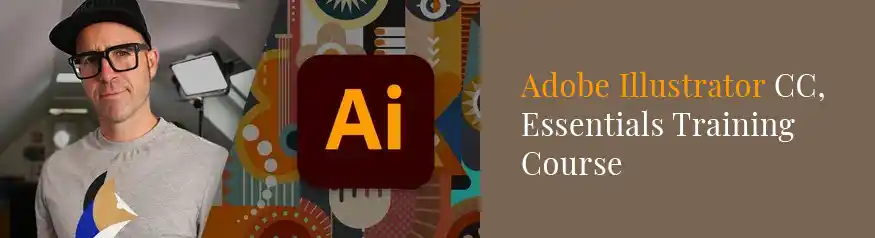
Adobe Illustrator CC — Essentials Training Course
Dan Scott is an Adobe Certified Professional and Adobe MAX Master Award winner — and this is the most thorough beginner course available on Udemy for Illustrator. The course takes you from the very first launch of the app through to producing real-world design projects including logo design, typography, icon sets, and illustrated characters. Every lesson uses downloadable practice files so you are always working on something tangible rather than following along passively.
For Etsy sellers specifically, the sections on the Pen tool, shape building, colour theory, and exporting files for print and digital use are directly applicable to creating sticker sheets, clipart, and SVG products. Furthermore, the course is updated regularly to reflect the current version of Illustrator, so nothing is outdated.
- Complete beginners who have never opened Illustrator before
- Etsy sellers who want to create sticker sheets, SVGs, and clipart
- Digital artists moving from Procreate into vector illustration
Adobe Illustrator CC — Advanced Training Course
This is the natural sequel to the Essentials course above, and it is where the real commercial potential of Illustrator opens up. The Advanced course covers 3D effects, complex gradient meshes, pattern creation, advanced typography treatments, and detailed commercial illustration techniques. Students work through a full professional brief from concept to finished deliverable — the kind of portfolio project that demonstrates serious skill to buyers and clients.
For Etsy sellers, the pattern creation section alone justifies the course price. Surface patterns, repeat tiles, and seamless background designs are among the most consistent sellers in the digital downloads category, and this course teaches the exact Illustrator workflow used by professional surface designers.
- Artists who know the Illustrator basics and want to go deeper
- Etsy sellers who want to add surface patterns and repeat tiles to their shop
- Designers building a professional portfolio for freelance or licensing work
Udemy Sales Run All the Time
These courses typically sell for $15–$20 during Udemy’s frequent sales. Lifetime access is included — you pay once and return to any lesson whenever you need it.
Browse Adobe Illustrator Courses →
Adobe Illustrator Mega Course — From Beginner to Advanced
If you want a single course that covers everything — from your first shapes through to advanced commercial work — the Mega Course is the most efficient option. It combines beginner and advanced content into one purchase, which means no mid-journey decision about whether to upgrade. The course covers the full Illustrator toolkit: drawing tools, typography, logo design, pattern making, digital illustration, and professional file output.
The course is particularly well-structured for self-paced learners who prefer to work through a topic end-to-end rather than break it into two separate purchases. At Udemy sale price, it typically costs less than buying the Essentials and Advanced courses separately.
- Learners who want one complete course rather than a two-stage path
- Self-paced learners who will work through content over several weeks
- Etsy sellers who want the full Illustrator skill set in a single purchase
Adobe Illustrator Course for Graphics Design
This course takes a design-first approach rather than a tool-first approach — meaning you learn Illustrator through the lens of graphic design principles. It covers branding, colour theory, layout, and visual hierarchy alongside the technical Illustrator skills. For Etsy sellers who want to create not just products but a coherent brand identity — shop banners, logo, packaging mockup overlays, and printables that all look consistent — this course fills the gap that purely technical courses leave.
Additionally, the branding sections are directly useful for anyone building an Etsy shop that needs to look professional enough to compete with established sellers. Typography and colour decisions that look intentional rather than random make a measurable difference to conversion rates.
- Etsy sellers who want to improve their overall shop branding and visual identity
- Artists who feel technically capable but want stronger design foundations
- Anyone who creates printables, planners, or template products on Etsy
Quick Comparison — Which Course is Right for You
| Course | Level | Hours | Best Etsy Use Case | Rating |
|---|---|---|---|---|
| Essentials Training (Dan Scott) | Beginner | 20+ | Stickers, SVGs, clipart, icons | 4.7 ★ |
| Advanced Training (Dan Scott) | Intermediate+ | 15+ | Surface patterns, repeat tiles, licensing | 4.8 ★ |
| Mega Course | All levels | 30+ | Everything — one complete purchase | 4.6 ★ |
| Graphics Design Course | Beginner+ | 20+ | Shop branding, printables, planners | 4.5 ★ |
Recommended Learning Path for Etsy Sellers
The DivinеWorks Illustrator Path — From Zero to Selling
What You Can Create in Adobe Illustrator for Etsy
The following product types are all built primarily in Adobe Illustrator and consistently appear in the top-selling digital product categories on Etsy in 2026:
- SVG cut files — for Cricut and Silhouette machines; one of the highest-volume Etsy digital niches
- Sticker sheets — illustrated PNG sticker sets for planners, journals, and digital notebooks
- Clipart bundles — themed PNG illustration packs (botanical, holiday, character, food)
- Surface patterns — seamless repeat designs licensed to fabric, wallpaper, and stationery brands
- Printable wall art — vector-based art prints that buyers download and print at home
- Logo and branding kits — premade brand identity packages for small businesses
- Planner and journal templates — PDF planners with vector layout elements
Frequently Asked Questions
Do I need to buy Adobe Illustrator separately to take these courses?
Yes — Adobe Illustrator is a separate subscription through Adobe Creative Cloud. It costs approximately $22–$35 per month depending on your plan. However, Adobe offers a 7-day free trial which is enough to complete the first several hours of any course and decide whether to continue. Udemy courses provide lifetime access, so you can pause, try Illustrator on trial, and return to the course when you are ready to subscribe.
How long does it take to learn enough Illustrator to create Etsy products?
Most students create their first simple Etsy-ready product — a basic sticker sheet or icon set — within 8–10 hours of the Essentials course. Producing professional-quality, consistently sellable products typically takes 20–30 hours of focused learning and practice. The courses in this guide are structured so that practical projects appear early, meaning you are building real work rather than just watching theory.
Is Adobe Illustrator better than Canva for Etsy products?
They serve different purposes. Canva is fast and accessible — excellent for editable templates that buyers customise themselves. Illustrator is the standard for creating original vector artwork — stickers, SVGs, clipart, and surface patterns that buyers download and use as-is. The most versatile Etsy sellers eventually learn both: Canva for template products, Illustrator for original illustration products. If you are choosing one to start with, Illustrator unlocks higher-margin, more unique products that are harder for competitors to replicate.
Can I use these Udemy courses on a Mac or Windows PC?
Yes. Adobe Illustrator runs on both Mac and Windows, and all Udemy courses work on both platforms. Dan Scott’s Essentials course specifically notes that lessons apply equally to Mac and PC users, with keyboard shortcut differences clearly noted throughout. The Udemy platform itself is accessible via browser, desktop app, or mobile app.
What is the best Adobe Illustrator course for someone who already knows Procreate?
The Essentials Training Course by Dan Scott is the best starting point even if you already know Procreate well. The tools, terminology, and workflow in Illustrator are fundamentally different from Procreate — vectors versus rasters, anchor points versus brush strokes, live effects versus destructive editing. The Essentials course moves quickly enough that experienced artists do not feel slowed down, while still covering every concept that a Procreate user would find unfamiliar in Illustrator.
Final Thoughts
Adobe Illustrator is not the easiest tool to learn — but it is the one that unlocks the most commercially valuable digital products on Etsy in 2026. SVG cut files, sticker sheets, surface pattern collections, and clipart bundles all require vector artwork, and Illustrator is where vector artwork is made. The courses in this guide make that learning path as direct and practical as possible.
Start with the Essentials Training Course by Dan Scott if you are new to Illustrator. It is the most thoroughly reviewed, regularly updated, and practical course available at this level. If you are already comfortable with the basics, move straight to the Advanced Training Course and focus on the pattern design modules — that is where the highest-earning Etsy products live.
For more course recommendations across other tools used by Etsy sellers and digital artists, see the full guide to the best Udemy courses for Etsy sellers.
Start Learning Adobe Illustrator Today
Udemy courses go on sale regularly — most Adobe Illustrator courses are available for under $20 with lifetime access and all future updates included.
Browse Adobe Illustrator Courses on Udemy →This post contains affiliate links. If you enrol through a link on this page, DivinеWorks may earn a commission at no extra cost to you.