
Best Clip Studio Paint Brushes on Creative Market
Finding quality Clip Studio Paint brushes can make a big difference in the speed and quality of your digital artwork. Consequently, many illustrators, Etsy sellers, and manga artists turn to Creative Market for brush packs that go far beyond what comes bundled with CSP out of the box. Furthermore, every brush on Creative Market includes a commercial license — so anything you create with them is ready to sell on Etsy, print on demand, or license to clients. In this guide, therefore, you will find the three best Clip Studio Paint brush packs on Creative Market right now, covering watercolor, grunge textures, and decorative stamp brushes.
Why Third-Party Clip Studio Paint Brushes Are Worth It
Clip Studio Paint ships with a solid set of default brushes — but professional digital artists rarely rely on them exclusively. In fact, the difference between default brushes and a well-crafted third-party set is immediately noticeable in the naturalness of brushstrokes, the accuracy of textures, and the speed at which you can build up realistic effects. Moreover, Creative Market brush packs are created by professional illustrators who have spent hundreds of hours refining their tools for real-world workflows. As a result, you get brushes that are optimised for the exact type of art you want to create — whether that is watercolor, grungy editorial illustration, or decorative clipart for Etsy.
Additionally, every brush sold on Creative Market comes with a commercial license. This means you can use these brushes to create artwork that you sell — on Etsy, through print-on-demand platforms, as digital downloads, or as client commissions. For Etsy sellers specifically, this commercial licensing is essential. Moreover, it is already included in the listed prices below, so there are no hidden fees or extra steps.
What to Look for in CSP Brush Packs
Before choosing a brush pack, it is worth knowing what separates a great set from a mediocre one. First, look for native CSP format (.sut or .zip for CSP) rather than .abr files — CSP-native brushes preserve pressure sensitivity and taper more accurately. Second, check whether the pack includes texture papers, color palettes, or canvas settings — these extras significantly speed up your workflow. Third, consider the style match: a watercolor pack designed for botanical illustration will not serve you well for manga linework, and vice versa. Consequently, the three packs below have been selected to cover the most common creative needs: painting, texture, and decorative stamp work.
Best Clip Studio Paint Brushes on Creative Market
Each of the following brush packs has been chosen for its quality, range of uses, and value. Furthermore, all three are commercially licensed — making them suitable for Etsy sellers, freelance illustrators, and content creators alike. In addition, each pack works with the tablet setup we recommend in our Procreate alternatives for Windows guide.
Watercolor Brushes Clip Studio Paint — by Julia Dreams
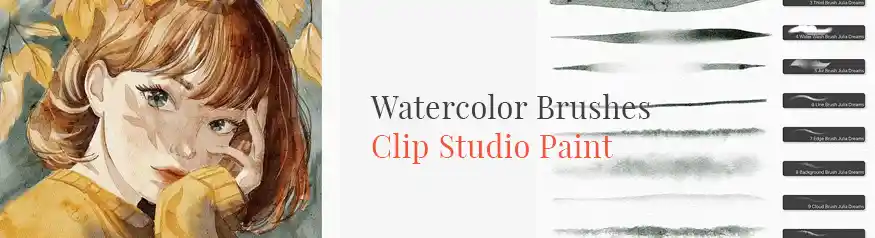
The Julia Dreams Watercolor Brushes set is a comprehensive painting kit designed specifically and natively for Clip Studio Paint. Moreover, it goes well beyond a standard brush pack — it includes magic canvases, custom color palettes, and sketch guides that together create a complete watercolor studio inside CSP. Specifically, the brushes simulate how real watercolor pigment spreads, bleeds, and layers on paper, which makes them exceptionally convincing for botanical illustration, children’s book art, and Etsy digital downloads. Furthermore, because this kit is CSP-native, all pressure sensitivity and taper settings are optimised for the app from the ground up. As a result, you get consistent, predictable results from the very first brushstroke — without the trial and error that comes with importing generic .abr files.
- CSP-native format — full pressure sensitivity and taper optimisation
- Includes magic canvases for instant watercolor paper texture
- Custom color palettes included — ready to paint immediately
- Sketch guides included for structured illustration workflows
- Realistic pigment spread and bleed simulation
- Commercial license included — sell artwork on Etsy and beyond
- Created by Julia Dreams — professional illustrator with thousands of 5-star reviews
Grunge Brush Set — by Zsolt Kosa Art
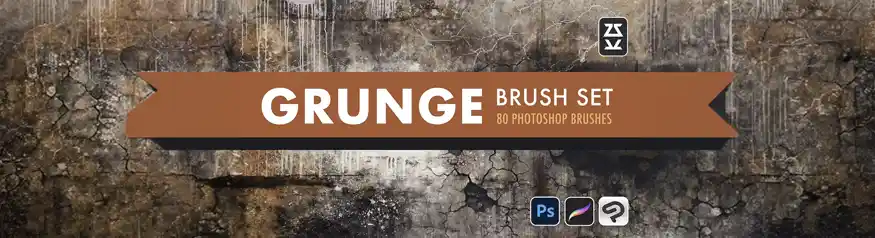
Zsolt Kosa Art is one of the most respected brush designers on Creative Market, with a reputation for creating high-quality texture sets that feel genuinely hand-crafted. The Grunge Brush Set delivers distressed, gritty, and rough-edged brushes that are perfect for editorial illustration, poster design, tattoo-style artwork, and mixed-media digital painting. Furthermore, these brushes import cleanly into Clip Studio Paint via the standard brush import workflow, making them immediately accessible to CSP users alongside Photoshop artists. Additionally, at $17, this pack represents excellent value compared to individual brush downloads. Overall, it is the go-to choice for any digital artist who needs authentic texture and grit in their work rather than the clean, polished look of default digital brushes.
- Authentic grunge and distressed textures for editorial and poster work
- Compatible with Clip Studio Paint and Photoshop
- High resolution — prints cleanly at large sizes
- Designed by Zsolt Kosa Art — thousands of verified Creative Market purchases
- Commercial license included — use in client and Etsy work
- Excellent value at $17 for a full professional texture set
Butterfly Stamp Brushes — by ArtPrintBabe
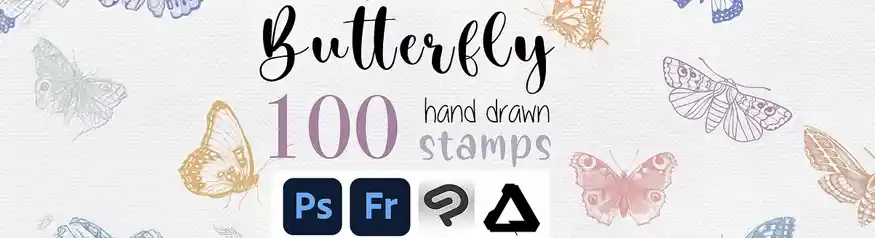
The ArtPrintBabe Butterfly Stamp Brushes are a beautifully crafted set of decorative stamp brushes designed for use in both Photoshop and Clip Studio Paint. Each brush is a detailed butterfly silhouette or motif that stamps cleanly onto your canvas — making them ideal for surface pattern design, Etsy clipart, greeting card illustration, and botanical-style artwork. Moreover, because they function as stamp brushes, you can layer them, resize them, and vary the opacity to create complex, organic compositions quickly and intuitively. Consequently, this set is especially useful for Etsy sellers who create nature-themed digital products, printable wall art, and pattern designs. At $15, it is the most affordable pack in this roundup — and one of the most instantly usable.
- Detailed butterfly stamp brushes — high-resolution and print-ready
- Works in both Clip Studio Paint and Photoshop
- Perfect for surface patterns, clipart, greeting cards, and printables
- Stamp brush format — layer, resize, and vary opacity easily
- Ideal for Etsy sellers creating nature-themed digital downloads
- Commercial license included — sell anything you create
- Most affordable pick in this roundup at $15
Quick Comparison: All Three Brush Packs
Not sure which pack to start with? The table below summarises all three side by side so you can choose based on your art style and budget.
| Brush Pack | Style | Price | CSP Native | Best For |
|---|---|---|---|---|
| Julia Dreams Watercolor | Watercolor painting | $26 | ✓ Native | Botanical, children’s book, Etsy art prints |
| Zsolt Kosa Grunge Set | Texture & grit | $17 | Importable | Editorial, poster, tattoo-style, mixed media |
| ArtPrintBabe Butterfly Stamps | Decorative stamps | $15 | Importable | Clipart, surface patterns, printable wall art |
How to Install Brushes in Clip Studio Paint
Installing third-party brush packs in Clip Studio Paint is straightforward once you know the steps. Furthermore, the process differs slightly depending on whether the brushes are CSP-native or imported from a Photoshop .abr file. Here is how to handle both cases:
Download and unzip the brush pack
After purchasing on Creative Market, download the file and unzip it to a folder on your computer. You will typically find .sut files (CSP brushes), .zip files (CSP material packs), or .abr files (Photoshop brushes that can be imported into CSP).
Installing CSP-native brushes (.sut files)
Double-click any .sut file and it will automatically open in Clip Studio Paint and be added to your Sub Tool palette. Alternatively, drag and drop the .sut file directly onto the Clip Studio Paint canvas window. The brush will appear in your currently selected tool group immediately.
Importing Photoshop brushes (.abr files)
Go to File → Import → Brush in Clip Studio Paint, then select your .abr file. CSP will convert the brushes and add them to your Sub Tool palette. Note that some pressure curve settings may need slight adjustment after import to match the feel of the original brush.
Installing texture and canvas materials (.zip files)
For packs like the Julia Dreams Watercolor Kit that include canvas textures and color palettes, go to File → Import → Material and select the .zip file. CSP will extract and register all the included materials — brushes, papers, palettes — in one step.
What to Look for When Buying Clip Studio Paint Brushes on Creative Market
Creative Market has hundreds of brush packs available, and not all of them work equally well in Clip Studio Paint. Therefore, it is worth knowing what to check before you buy. The following factors will help you tell a great pack from a poor one.
Check the File Format First
CSP-native brushes (.sut or .clip files) will always perform better in Clip Studio Paint than Photoshop .abr files that have been imported. Specifically, native brushes preserve grain textures, dual brush settings, and CSP-specific pressure curves. Moreover, native packs often include bonus materials — texture papers, color palettes, and canvas presets — that .abr imports cannot include. However, high-quality .abr sets like the Zsolt Kosa Grunge Brush Set still perform very well after import, particularly for texture and stamp-style brushes.
Read the License Details
On Creative Market, brushes are sold with either a personal or commercial license — and the difference matters enormously for Etsy sellers. A personal license means you can use the brushes for your own projects only. A commercial license means you can sell artwork, digital downloads, and print-on-demand products created with the brushes. Consequently, always choose the commercial license if you plan to monetise your artwork. All three packs recommended in this guide include a commercial license at the listed price.
Look at the Preview Images Carefully
The preview images on a Creative Market brush listing show exactly what the brushes produce — so spend time examining them before purchasing. Additionally, look for preview images that show the brushes used in context (full illustrations, not just isolated strokes) as this gives a much more accurate sense of how the pack performs in a real workflow.
More Clip Studio Paint Resources on DivinеWorks
- 🖥️ Best Procreate Alternatives for Windows in 2026 — why Clip Studio Paint is our top pick
- 🖌️ Huion Kamvas 22 Gen 3 Review — the best tablet to pair with CSP on Windows
- ⚖️ Huion vs Wacom 2026 — which drawing tablet brand wins?
- 🛒 Best Digital Products to Sell on Etsy — turn your CSP artwork into income
- 🖋️ Best Tools for Digital Artists in 2026 — full creative toolkit roundup
- 📚 15 Best Books for Graphic Designers — build your design knowledge
Frequently Asked Questions About Clip Studio Paint Brushes
Can you use Creative Market brushes in Clip Studio Paint?
Yes — in two ways. First, brushes sold as CSP-native files (.sut format) install directly into Clip Studio Paint with a double-click. Second, Photoshop .abr brush files can be imported into CSP via File → Import → Brush. CSP-native brushes generally perform better, but high-quality .abr sets also work well after import, particularly for texture and stamp brushes.
Are Creative Market brushes commercially licensed for Etsy selling?
Yes, provided you purchase the commercial license tier. On Creative Market, most brush packs come with a personal license (for personal projects only) and a commercial license (for selling work you create). All three packs in this guide include a commercial license at the listed prices. Therefore, they are fully suitable for Etsy digital downloads, print-on-demand products, and client commissions.
What is the best free source of CSP brushes?
Clip Studio Paint’s built-in Assets store (accessible directly from within the app) offers thousands of free community-made brushes. Moreover, the quality of free Assets store brushes is genuinely impressive — many professional artists use them alongside premium Creative Market packs. That said, Creative Market packs offer more polish, better documentation, and reliable commercial licensing. As a result, they are the preferred choice for professional and Etsy work.
Do I need the EX version of Clip Studio Paint to use these brushes?
No — all three brush packs in this guide work in both Clip Studio Paint PRO and EX. The EX version adds animation and multi-page document features, however brush compatibility is the same across both versions. Consequently, you can start with the PRO plan and still access every brush pack recommended here.
How many brushes should I buy when starting out in CSP?
Start with one pack that matches your primary art style — for example, the Julia Dreams Watercolor Kit if you paint in a soft style, or the Grunge Brush Set if your work leans editorial and textured. In addition, explore the free Assets store inside CSP before spending money, since there are excellent free options available. Overall, a small, focused library of 2–3 premium packs is more useful than downloading dozens of sets you will rarely open.
Final Verdict: Best Clip Studio Paint Brushes on Creative Market
For the most complete and immediately usable brush pack, the Julia Dreams Watercolor Brushes ($26) is our top pick. It is CSP-native, includes magic canvases and color palettes, and produces genuinely beautiful results from the very first session. Moreover, it comes with a commercial license, making it ideal for Etsy sellers and digital illustrators who want to monetise their watercolor artwork.
If you work in editorial illustration, poster design, or mixed-media art, the Zsolt Kosa Grunge Brush Set ($17) delivers outstanding texture quality at an excellent price. Additionally, the ArtPrintBabe Butterfly Stamp Brushes ($15) are a fantastic affordable pick for anyone creating decorative clipart, surface patterns, or nature-themed Etsy products.
All three packs are available on Creative Market with commercial licensing. Furthermore, if you are not yet using Clip Studio Paint, a free trial is available — no credit card needed. Read our full guide to the best Procreate alternatives for Windows to see how CSP compares to other drawing apps.