Creative Market

Louve Shadow Mockup Scene Creator


Louve Shadow Mockup Scene Creator


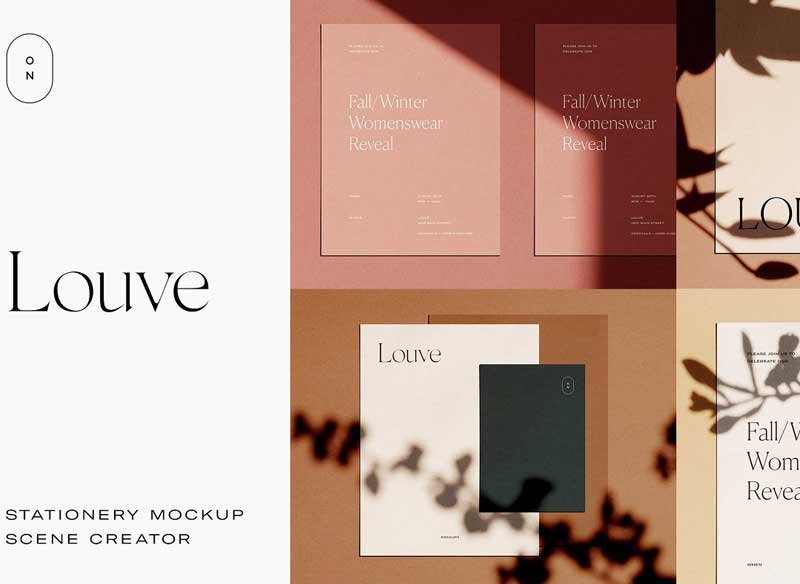
Following the release of the initial Louve (4-Pack) set of stationery mockups, the Louve Mockup Kit is a photo-based scene creator featuring natural sunlight and botanical shadows – ideal for creating photorealistic stationery mockups with a casual, authentic vibe. Using smart layers, you can easily swap out your own designs and imagery with just a few clicks, and the numerous paper size, background, and shadow options offer infinite possibilities for customization.

The photo-based textures, filtered sunlight, and organic shadows included in this kit make it perfect for bringing a natural, personal ambience to your online shop, portfolio, and social media posts.

Files:

・1 PSD file.
・PDF instructions file.

Details:

・Smart object layers (simply double click layer, place design, and save).
・23 paper options, listed below (with ability to duplicate, resize, and rearrange).
・12 shadow overlay options (with ability to adjust intensity).
・3 background images + option to choose any background color/use your own image.

Included Paper Sizes:

・8.5 x 11″.
・5×7″.
・5×5″.
・4×9″.
・3.5 x 5″.
・3.5 x 2″.

・A4 (210 x 297 mm).
・A5 (148 x 210 mm).
・A6 (105 x 148 mm).
・A7 (74 x 105 mm).
・A8 (52 x 74 mm).
・A9 (37 x 52 mm).

(All paper sizes come in both a vertical + horizontal version, aside from the 5×5″ size).

Please Note:

・Editable text and photographs featured in the design previews are not included in the download.
・After purchase, please refer to the Instructions file for steps, tips, and notes for using the kit.

Thanks for visiting! Please send along any questions pertaining to the fonts + colors used in the preview images via direct message (as opposed to a comment).

divineworks

Recent Posts

Best Figma UI/UX Design Courses on Udemy in 2026 (For Designers Ready to Pivot)

AI changed what entry-level design work looks like, but it didn't remove the need for…

1 week ago

How to Set Up a Drawing Tablet for Digital Painting in 2026 (Complete Beginner Guide)

Your pen pressure feels off, lines lag behind your hand, or the tablet barely registers…

1 week ago

Clip Studio Paint for Beginners: The Complete Guide to Digital Painting

Photoshop is a photo editor, not a drawing tool. Krita is free but complex. Procreate…

2 weeks ago

AI Voice Generation for Animation: Give Every Character a Unique Voice

Hiring voice actors costs hundreds per session. Yet robotic text-to-speech kills the mood instantly. In…

2 weeks ago

Best Cricut Machine for Etsy Sellers in 2026: Explore 5 vs. Explore 4 vs. Maker 4

Choosing the wrong Cricut machine can cost you time and money. In this guide we…

2 weeks ago

Logo Templates for Designers: What Professionals Actually Use & Why It Makes Business Sense

A practical guide for graphic designers — when logo templates are the right call, what…

2 weeks ago