XP-PEN Artist22E Pro Drawing Pen Display Graphic Monitor
- Functions such as drawing, sketching, painting, design, and editing can now be performed directly on the surface of your monitor. Expand your creativity and work naturally and intuitively. Artist22E Pro drawing monitor meets the needs of all types of digital artists at any skill level
- Features 16 customizable Express keys. Compared with Artist 22E, 16 express keys have 16 different functions for convenience and efficiency. It is designed for both left and right handed users. The driver allows the express keys to be attuned to many different software
- Our 21.5 inch drawing pen display features 1080p resolution with 72% Color Gamut and an extra-wide 178° viewing angle. The Max Report Rate of the Artist 22E Pro has increased to 266 RPS with 8192 pressure levels provides unprecedented accuracy and precision in your work, to make lines flow smoother and perform better, working faster and efficiently
- The Artist 22E Pro driver can support 4k displays. The custom-designed anti-reflective coating reduces glare by 56 percent. Latest Multi-function Pen Holder. It can keep your pen, pen nibs. You can use it as a pen stand and pen holder. It’s convenient for you to take everywhere
- Artist22E Pro Graphic drawing monitor supports Windows 7/8/10 and Mac Os x 10.8.x or later. Compatible with popular digital art software such as Adobe Photoshop, Corel Painter, Comic Studio, SAI, Zbrush, Medibang Paint, Toonboom Harmony etc.
Important Notice:
1. Artist22E Pro is NOT a standalone product!!!
- This device must be connected to a computer to work. It is compatible with Windows system 10/8/7(32/64bit), Mac OS X version 10.10 or later.
2. About the Protective Film
- Artist22E Pro drawing pen display comes with protective covers(plastic layer) to avoid damages to the surface from hand grease, scratches, etc.
- Please peel off the protective covers(plastic layer) before the application! The real protective film is under the protective covers(plastic layer).
3. Connection Tips
- Your computer needs to have HDMI and USB ports available for the connection, if not, you need an adapter to convert for the connection. Please confirm the Black USB Cable and the HDMI Cable completely plug into your computer. And don’t forget to connect the power adapter.
- If your computer only has Type-c ports, you need a Type-c to HDMI and USB adapter for the connection.
Other Tips: After connecting all the cables in the correct places, please wait about 30s~1min to make the USB Hardware driver loaded successfully.
4. Driver Download and Installation Tips
- Driver Download: Our driver will be regularly updated, so please go to our official web to download the newest driver, and install it on your computer.
4.1 Before Driver Installation:
- Please Remove Other Brand’s Driver from your computer and reboot before installing the XP-PEN’s driver, or there will driver conflict problems.
4.2 For Windows Users:
- Please close all drawing programs and run the driver as Administrator when installing the driver. (IMPORTANT)
4.3 For Mac Mojave (10.14), Catalina (10.15) Users:
- Our driver is compatible with Mac OS Mojave (10.14), Catalina (10.15), If your operating system is the newest Mojave 10.14 or Catalina (10.15), please install the newest released driver on your computer and reference to the FAQ “How to install driver in Mojave /Catalina” on the XP-PEN Website.checks the
5. XP-PEN Provides Lifetime Technical Support on all Our Drawing Pen Tablets/Displays
- When you have problems with the use of the Artist22E Pro, please checks the Quick Guide, search XP-Pen online to find a way to us for further assistance, we are always standing by to help!
8192 Levels of Pressure Sensitivity
Latest P02S stylus technology provides 8192 levels of pressure sensitivity and Max to 266 RPS, allowing you to create your remarkable piece with superior control and stunning fluidity. A full charge provides up to two months of scribbling, sketching, and designing.
Our Multi-function Pen Holder is included to keep your pen and pen nibs safe. You can use it as a pen stand or a pen holder.
The Artist 22E Pro driver supports 4k displays, now you can enjoy every sharp detail. The custom-designed anti-reflective coating reduces glare by 56 percent. Your screen will continue to look clear and beautiful, even if it’s bright out.
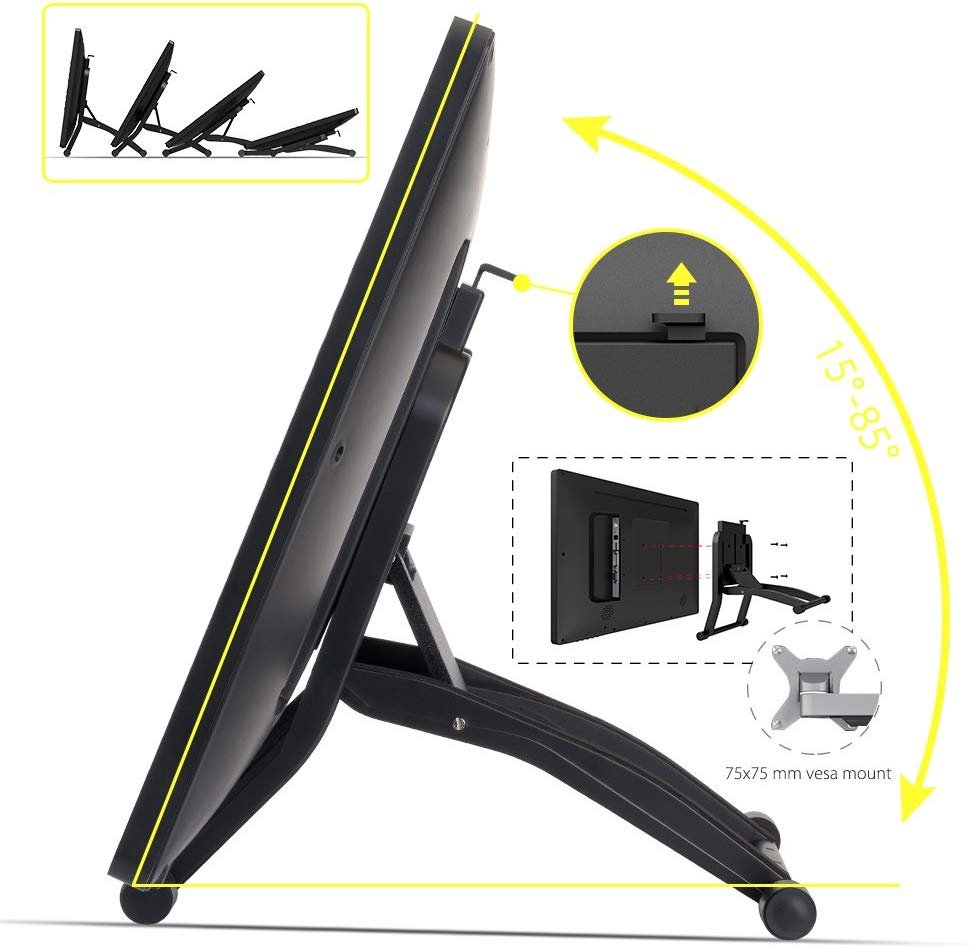
The sturdy, adjustable, and ergonomically designed stand prevents shaking and sliding, providing a comfortable drawing experience. It can also be attached to a 75×75 mm vesa mount.